

PDF-ShellTools 
 Interact with your PDF documents directly from the Windows Shell!
PDF-ShellTools is a software that extend the Windows Shell and provide access to several tools to work with PDF documents directly from the Shell environment.
With it we can perform many common tasks with our PDF documents, and without the need to open Adobe Acrobat or any other PDF desktop application.
Directly from the Windows Shell is practical but sometimes it is better if we can control the power the tools provide from batch and script operations, or even, from another application. To allow that it also provides a command line and DLL interface.
The current implementation include the tools:
- PDF-InfoTip - Show file metadata information in shell Infotip balloons.
- PDF-InfoEdit - Files property sheet to edit the metadata information.
- Preview Handler Tools - View, edit and capture metadata, directly from the Windows Explorer preview pane. Easily fill the metadata properties, extracting text or OCRing page snapshots of the text to extract.
- Insert/Append/Attach on Drop - Insert, append or attach supported document(s) onto a PDF file, by drag dropping it onto that PDF file.
- Column Handler - Supported in Windows 2000 and XP, provides the ability to add new columns to the details view of Windows Explorer details view pane, in our case to show PDFs metadata fields. Very useful to easily identify and sort PDFs.
- Property Handler - Introduced in Windows Vista, this powerful extension provides Shell read and write access to, in our case, PDFs metadata. It is used by the Windows shell to show, sort and group by metadata properties in Windows Explorer columns, file dialogs, info tip balloons, edit metadata from the explorer, and file properties, details panes. It's also used by the Windows search indexer to index PDFs, that can then be easily found searching for its metadata content.
- Thumbnail Handler - Enables the Windows shell, or third party applications, to show thumbnails for PDF documents.
- Filter handler metadata properties extender - To extend the installed PDF filter with all the custom defined metadata properties.
- The Reader - A stand-alone reader and editor for various file formats, with multi-tab and side-by-side views, and support for pinned tabs. It can open PDF documents, comic books, and all the image formats with a WIC-compliant codec installed in the system.
- Shell Context Menu Tools - Accessible from the Shell file context menu, the menu that pop-up when we right click a file in the Windows Shell.
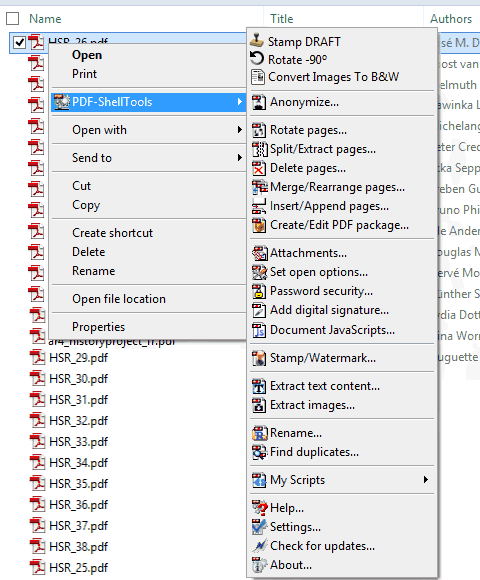
- My Tools - Any of the command line functions, or external program, easily called from the Shell context menu. Represented in the above screenshot as the first 3 items, above the anonymize, as a sample of the possibilities.
- Anonymize - Remove all the metadata traces from the PDF files.
- Rotate pages - Rotate PDF document pages by 90º increments.
- Split/Extract - Extract pages, or range of pages, into new PDF documents.
- Delete pages - Delete pages, or range of pages, from selected PDF documents.
- Merge/Rearrange - Merge several PDF documents, or rearrange source file pages structure, into a new PDF document.
- Insert/Append - Insert one, or more, documents pages after, or before, a specified page number of another PDF document.
- Create/Edit Packages - To create and edit PDF Packages, and edit PDF Portfolios.
- Attachments - Add, remove, consult and extract PDF file attachments.
- Set Open Options - Configure the initial view of PDF documents. Can set, full screen mode, initial page, initial magnification, layout, page mode, etc.
- Set/Reset Password Security - Control the access to the PDF documents contents using password protection.
- Add Digital Signature - To digitally sign PDF documents, with possibility to define its graphic appearance and position, time stamp it, and even sign already available unsigned signature fields.
- Document JavaScripts - To add, view and edit PDFs JavaScript functionality.
- Stamp/Watermark - Stamp text, images, multimedia objects, geometric shapes and PDF page contents into PDF document pages.
- Extract Images - View and extract PDF document image objects, or entire page renderings, with Drag&Drop, Clipboard and batch extraction operations.
- Extract Text Content - Extract the PDF documents text content into text files.
- Rename - Rename, and organize by folders, the PDF documents using its metadata information as source to compose the file name or folder structure.
- Find Duplicates - To easily find, compare and manage PDF documents duplicate candidates, searching among the selected files, or deeply scanning in folders and sub-folders.
- My Scripts - The power of Windows Automation scripting technology directly from the Shell context menu, to execute on PDFs, or any other configured file type. Compatible with the Windows Scrip Host object model, i.e. can run scripts developed for the WSH, and with a specific root object to access the internal PDFs management functionality already provided by the other tools. Code your own tool, with the embedded, and very complete, editor and debugger, in JScript or VBScript, or any other Active Scripting enabled language, and run it directly from the Shell right click menu.
- Settings Editor - A powerful functionality manager, where all the aspects of the tools can be configured.
General
For screenshots, and more detailed explanation of the tools features, take a look at the online PDF-ShellTools user's guide.
Select one of the available localizations:


Note: Only the English version of the manual is granted to be updated with the last version features.
And don't forget to download a trial copy from the downloads page, and discover by yourself what this tool can do for you.
Any suggestions, ideas for more tools, feedback and comments, are welcome and won't be ignored.
Join to the Forum, and post your comments, questions on how to achieve a specific task, or to report any problem you may have found.
System Requirements
Microsoft© Windows Operating System, 32-bit or 64-bit
(95/98/ME/2000/XP/2003/Vista/Windows 7/Windows 8.x, Windows 10, Windows 11)