

PDF Explorer 
Organizing pdf and chm documents has never been so easy!
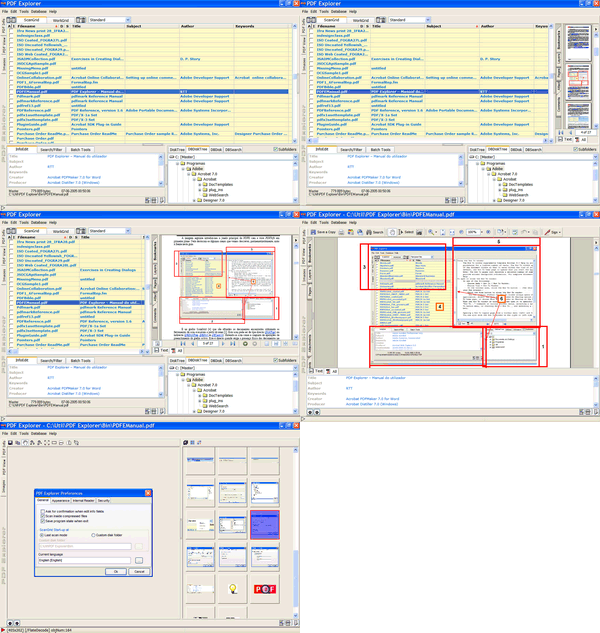
PDF Explorer is a PDF and CHM file management software.
It allows the effortless indexation of our PDF and CHM documents in a database using several metadata fields, such as:
- The system file specific fields: filename, file size and file date.
- The standard metadata fields: title, subject, author, creator, producer, creation date, modification date and number of pages.
- And as much as 100 custom fields to enter custom metadata.
With PDF Explorer we can easily index our entire collection of documents, spread by several disks, network places and also within ZIP, RAR, 7Zip and ACE compressed archives.
We can then search for the files using boolean expressions and full text search, view them, extract images, extract text, apply batch functions, and more.
PDF Explorer can also read out loud the documents text so we can relax our eyes, or create wav or mp3 audio files we can listen later.
PDF Explorer also includes a Web Server, providing remote access to some of the program functionalities using a simple web browser. We can leave the server running at home and access to our PDFs collection from work office, or vice versa. We can also construct, with this functionality, a server-client schema at our office LAN.
Key Features
- Index PDF and CHM documents, metadata and pages text content, on local folders, network places, and even inside .zip, .rar, .7z and .ace compressed archives.
- Add and edit metadata fields, including custom fields defined in the XMP object.
- Edit the metadata fields with the help edit assistants, such as the Quick Image OCR that helps in the extraction of metadata from scanned pages only documents.
- Boolean and full text search.
- Image objects viewer, editor and extractor.
- Text viewer and extractor.
- Batch tools to rename, extract images, edit metadata, print, the multifunctional Search&Extract tool, and more.
- The My Scripts tool, used to extend the functionality with custom developed Windows Automation enabled scripts, compatible with the Windows Scrip Hosting, using the built-in and very complete editor and debugger, with access to the richness set of the PDFE functionality.
- Text to speech read out loud functionality, SAPI4/5 voices compliant, with possibility to speak text to file, in wav or mp3 format.
- ISBN and DOI numbers catcher/sniffer and resolver.
- Hot folders, with the task automation tool.
- Auto index files, with a background folders indexer monitor.
- Web interface, provided by an embedded HTTP server.
- Rotate pages tool, with deskew functionality.
- Delete pages tool.
- Anonymize tool, to remove all traces of metadata info.
- Split/extract and merge/rearrange PDF pages tools.
- Stamp/watermark PDF pages with text, images, flash animations, audio, video and geometric shapes.
- Add, edit and reset PDFs password security.
- Set PDF open options tool.
- Easily get ride of PDF file duplicates with the find duplicates tool.
- Add signature tool, to digitally sign PDF documents.
- Document JavaScripts tool. To add, delete and edit PDF JavaScript actions.
- Attachments tool, to add, remove and open PDF file attachments, and other PDF embedded files.
- Powerful PDF packages tool, to create and edit PDF packages and portfolios.
- Import and export metadata fields.
- Grid layout editor, to easily mask our files metadata.
- Database maintenance and backup features.
- Multilingual interface and user's guide.
Web interface
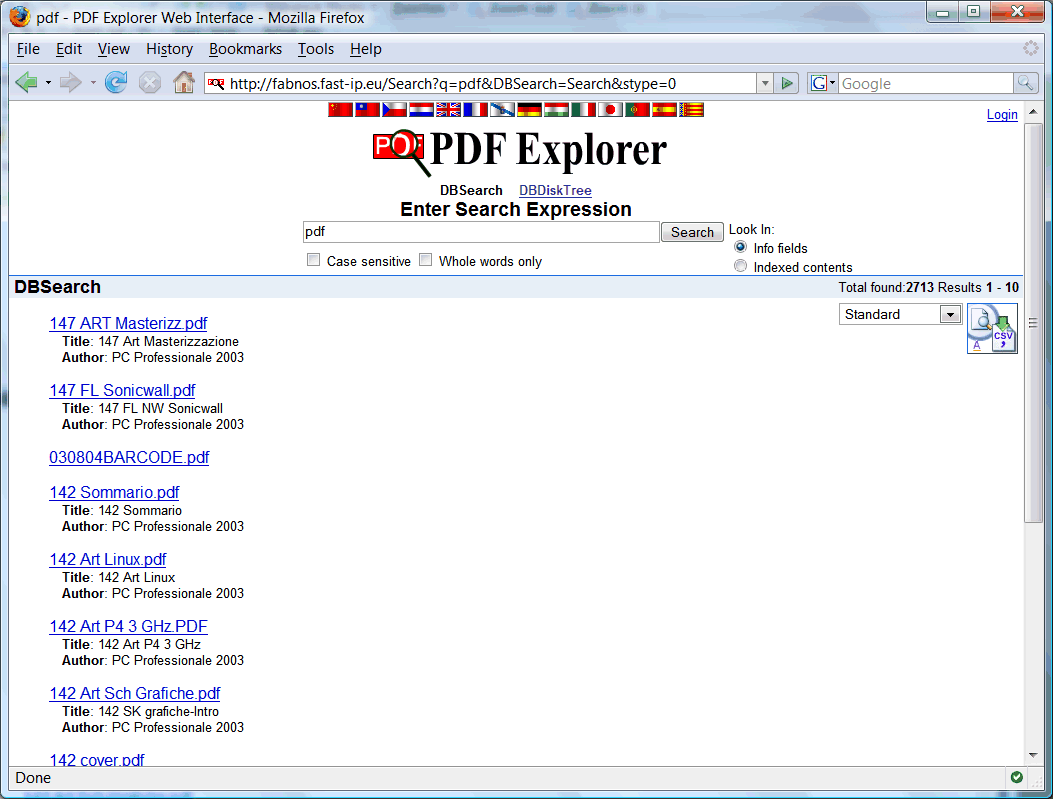
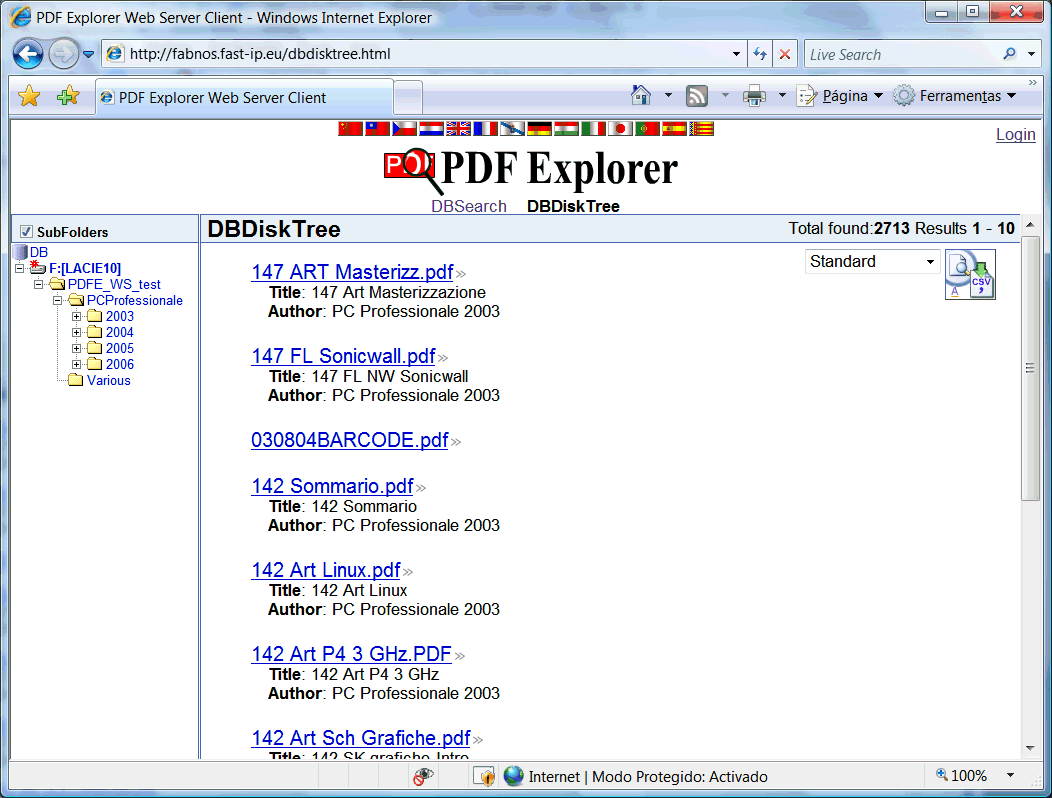
The web interface functionality provide remote access to some of the PDF Explorer features. The access client can be as simple as a web browser, or any other tool/technology that is able to use the provided web interface REST API.
- Access office documents collection from home, or vice-versa.
- Create a Server-Client structure at the office LAN, where client PCs can search and access documents at the server.
- The server has extended functionality, and can be used to implement a local web server, with support for PHP or any other compatible server-side scripting language
Two screenshots of the basic html client:
Try it now!
Web interface demo site
This PDF Explorer, with enabled web interface, is running at a normal office PC connected to the Internet with a normal ADSL Internet connection, like the one we all use to connect to the Internet from home.
With the provided Web Interface REST API, it's also possible to develop advanced clients, such as the javascript based, with full source code available, provided as a test bed for this API. More information at this forum topic.
System Requirements
Microsoft© Windows, 32 or 64 bit.
(95/98/ME/2000/XP/2003/Vista/Windows 7/Windows 8.x/Windows 10/Windows 11)
Any suggestions feedback and comments are welcome, and won't be ignored.
A 30 days Trial version is available from the downloads page.
Join to the PDF Explorer mailing list
Receive program update news and other announcements.
Your information is confidential.
Don't forget to check out the PDF Explorer Forum, the primary source for PDF Explorer support.